

graphomate
comments
Interactive comments in SAP Analytics Cloud (SAC)

With graphomate comments we offer you the possibility to enrich your SAC dashboards with text. The comments are stored according to the selected filter constellation – the context of the comment – and are displayed again when the corresponding filters are selected again.
The advantages of graphomate comments at a glance
- Store comments in separate, freely positionable text field, for individual data points or as titles for individual diagrams and tables
- Dynamic display of comments in the context of the filters you have set up
- Comments on import or live data sources from DataSphere or SAP BW in SAC
- Assign roles and authorizations on a transaction and content basis
- Store comments in your own on-premises database
- Comments are also displayed as a numbered list
- Comments are stored with their history
graphomate comments are available for

Commenting on business figures
Good visualizations help to better understand data and identify patterns or trends. This is where our graphomate suite comes in, offering the powerful and flexible graphomate charts and chartrix (charts), graphomate matrix (tables) and graphomate tiles support BI tools such as SAP Analytics Cloud, Power BI and Tableau, as well as MS365.
We have enabled our customers to define a visualization standard and to visualize data in a way that is relevant and meaningful. By creating a ‘visual context’, decision makers can more easily and better understand the business situation.
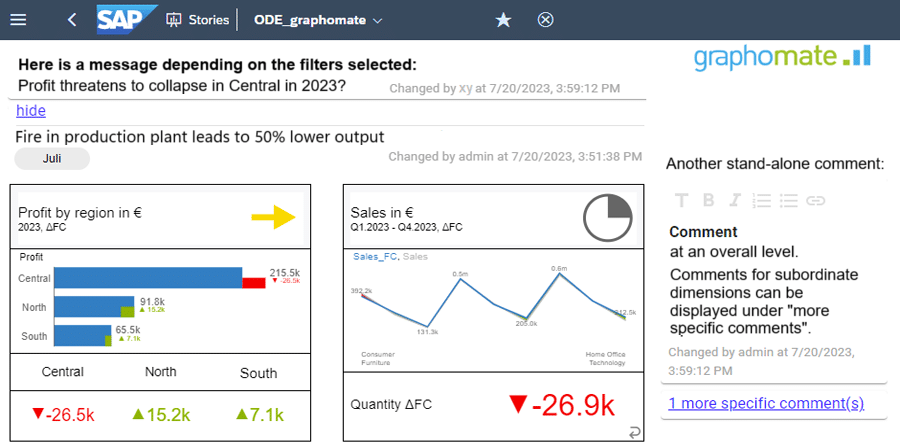
With graphomate comments, it is now possible to enrich data constellations requiring explanation with explanatory text at various levels:
1. Comments as a stand-alone text object
A freely positionable stand-alone custom widget provides space to enter explanatory text for a specific data constellation. Comments are stored with the creator and date of creation, and will be displayed the next time the data constellation is accessed.
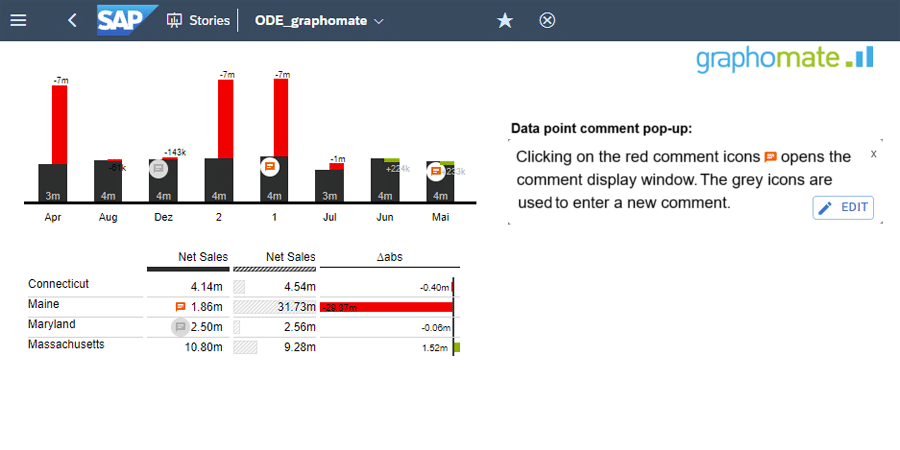
2. Comments on a data point
Data point comments explain a specific data value in a component of the graphomate extensions.
These comments are either displayed as full text in the header area or appear in a pop-up when you click on the indicator icon.
These data point comments are currently available in our graphomate charts and the graphomate matrix. Integration with graphomate tiles and the graphomate chartrix will follow shortly.
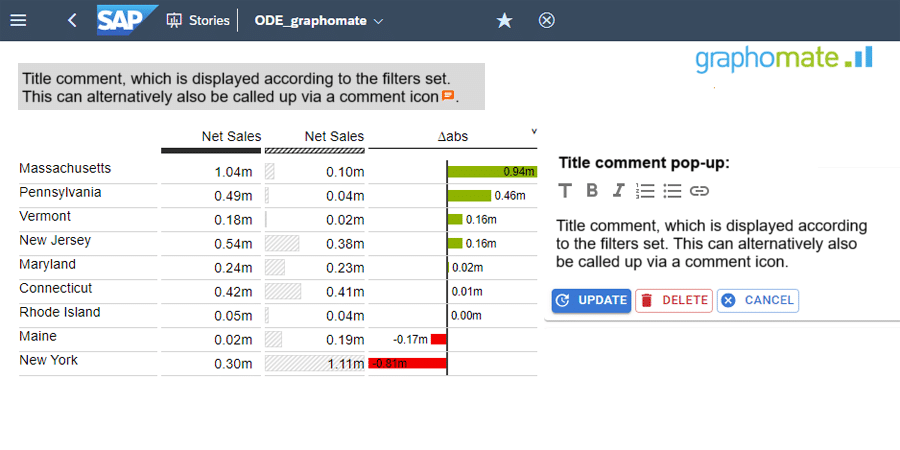
3. Comments on a visualization component
Comments can also be saved as titles in a visualization component of the graphomate suite.
The title of the component should describe a recognisable trend or pattern, rather than a single data point. These comments are displayed either in full text or as an icon.
graphomate comments allows you to map content-related permissions on a contextual level.
Would you like to try out graphomate comments? We are happy to provide you with fully functional demo versions. Please contact us directly.
You can request demo versions of all other graphomate extensions by simply clicking on the green banner:

